Core Concepts
The following are the topics identified in the Kubernetes Certified Administrator Exam Curriculum.
- Understand the Kubernetes API primitives.
- Understand the Kubernetes cluster architecture.
- Understand Services and other network primitives.
Introduction
Kubernetes is a container orchestration platform.
"Kubernetes is an open-source system for automating deployment, scaling, and management of containerized applications. It groups containers that make up an application into logical units for easy management and discovery."
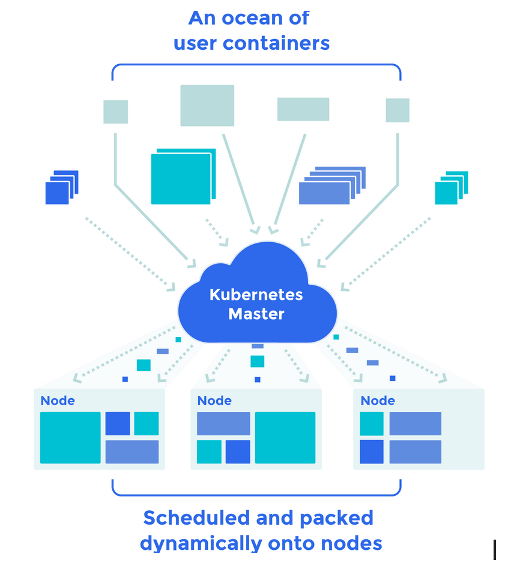
The Giant Computer
Kubernetes may be viewed as weaving multiple physical or virtual machines together to provide a single substrate on which to place containers and groups of containers. So in a way a stitched together large computer.
Kubernetes further takes care of the many issues such as the placement of containers, their life cycle management, scalability, networking and discoverability.
I have always found it useful to learn a new technology based on the frame of context provided by a preceding technology (even though the parallels may not be fully accurate and only serve as a starting point).
Many of the concepts around Kubernetes especially for the Cloud Administrators also have parallels in Cloud Platforms such as Amazon's AWS or Microsofts Azure. For example where as in Cloud Platforms we speak of VMs with Kubernetes we speak of Containers and Pods.
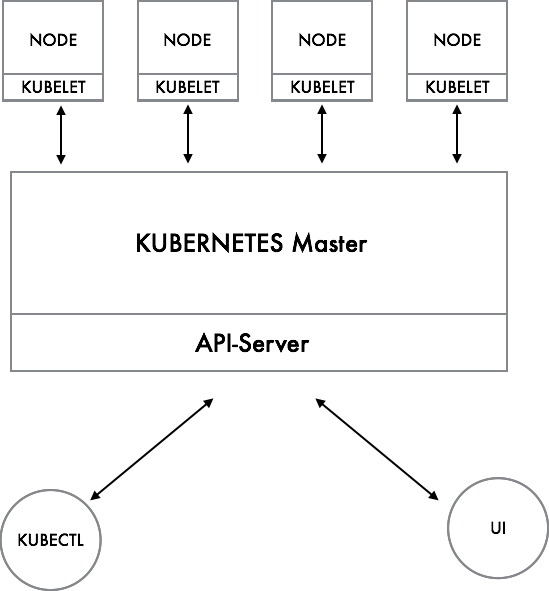
Interacting with Kubernetes
As in most clustered systems the Kubernetes platform has a Master Node which is responsible for the platform management function and Worker Nodes which host the Pods. The Master Node provides the API for managing the cluster. As such it may be viewed as for example the AWS Cloud which provides a REST API for management, The KubeCTL which is like the AWS-CLI and the UI which is the AWS Console. Both the UI as well as the KubeCTL utilize the underlying API.
ETCD : The Database
When you work with Kubernetes you will often come across the term ETCD. ETCD is a database that is used by the Master to maintain information about the Cluster. It is a Key-Value Database.
The Kubelet : The Node Management Agent
The Master Node in turn communicates with 'node-agents' which run on each node - The Kubelet. The Kubelet for managing and monitoring the various Pods which are assigned to the Node.
The Kubelet is a low level component and can actually be run on its own, it provides a REST API which is used by the Master Node to communicate with the Node. The API can also be directly if required.
Containers and Pods
A Kubernetes installation may be viewed as a VPC, a defined sub-net within which the VMs are hosted. The parallel to VMs in Kubernetes terms are Pods. Pods may consist of one or more Containers who share a common storage and network IP. Just as in VMs on AWS the IP assigned to a Pod can change if the Pod is terminated and restarted. It is also important to note that all containers within a Pod will be hosted on the same Node.
Pods have a single IP assigned to them, though that is changing and Pods may have multiple-IPs assigned with some of the new Network Plug-ins. When your Kubernetes Cluster is running you must assume that the Pods may get stopped, deleted and recreated during the course of the application lifecycle.
Just as in VMs you would avoid placing unrelated containers together you do the same with Pods. The containers tend to be tightly coupled. So for example you may place a web server container together with a container that sends log files from the Web Server to a central location from the storage shared between the 2 containers.
By separating the Webserver from the Log Forwarding container you ensure that the log forwarding container can also be used for forwarding logs from other systems such as Databases.
In fact the primary motivation of the Pod abstraction is to allow for the coupling of helper containers such as log management and file loader helper containers with the main container within the Pod.
Using the similar logic you would not place Webserver and MySQL in different Pods for greater resilience and tier specific scaling just as you would do in a traditional cloud based architecture.
The pattern of co-locating helper contaieners with a 'Parent Application' is known as the Sidecar Pattern. There are a number of patterns used in Kubernetes and Cloud Clusters. You can read about these in the Chapter - Kubernetes Design Patterns.
Storage
Within the Cloud Perspective you attach storage to VMs. There is no guarantee of the storage if you terminate the VM unless you map a EBS volume for instance. In Kubernetes there are multiple types of storage ranging from the ephemeral (like in containers) to the permanent and shared storage across VMs.

The storage provided to VMs come from Network Attached Storage which are distributed file systems. Kubernetes provides support for a variety of popular systems through Plug-Ins including NFS, AWSElasticBlockStore, GlusterFS, Ceph etc. The underlying complexity of storage integration is handled by plug-ins. As a day to day operator one does not need to be concerned much about the details of the underlying storage, the work tends to be limited to defining the size of storage and the life-cycle of the storage.
Scheduling
As mentioned earlier the Kubernetes Master is responsible for deciding where to place the Pods. This is known as Scheduling. The Kubernetes Master does the scheduling based on Rules/Configurations that you provide to it while creating the Pods.
As you work on Kubernetes you will often specific the configurations of the container groupings, the storage attachements and so on. These are provided to the platform through YAML (or JSON) files. When the Master receives the Pod configuration information it will decide on which Node to place it and communicate with the Kubelet to ensure Pod placement. It will also regularly monitor the Kubelet to ensure the Pods are working and create new Pods if a Pod stops to work.
Managing Scaling and Deployments
When you need to scale within the cloud you would add a number of VMs hosting the same service and provide a way to cluster them. So in the case of Kubernetes you would scale by replicating the Pods. This feature is implemented by Kubernetes Replication Controllers (the old way), Replica Sets and Deployments.
Let us take the example of a Webserver. In order to scale a webserver you would in normal context place a web server on multiple VMs and front it with a Loadbalancer which distributes the load between the different VMs where the Webservers are hosted. In this case you are ensuring
- That each Webserver is on a separate physical server or VM
- That there is a mechanism to Load balance between the 2 servers.
- There is a single IP provided by the webserver to which the client accesses.
Implementing this on your Large Computer is a bit tricky, because you have to ensure the Pods do not end up on the same Node so if the Node collapses your service does not collapse. Kubernetes will make an effort to ensure that the Pods of the same type do not end up on the same nodes. It also provides the mechanisms to ensure more granular control capability which is not required in most cases.
"A Replication Controller is a Kubernetes abstraction which ensures that a specific number of pods are running at all times. If a pod or host goes down, the replication controller ensures enough pods get recreated elsewhere."
Many of these capabilities are built on the Platform Feature of 'Labels'. Labels are Key-Value pairs such a 'env=dev' or version='1.1' which are applied to the various 'Resources' within the Kubernetes platform such as Pods. These in turn help to enable the Platform as well as the User to select and filter objects together.
An example use case is to Label a set of Pods with 'env=dev' and 'version=1.1' and being able to select all of the pods that meet this filter criteria and start or stop them at the same time.
Or for example label all pods that constitute the front-end infrastructure and which must have the same number of replicas. So that one can manage the number of instances together. These replica sets, and their consituent pods and configurations are specified within a Replica Set and submitted to the Kubernetes Master to manage.
Beyond the Replica Set there is another layer of abstraction called Deployments which are a key component of Kubernetes.
Deployments are provide the replication functions (through Replica Sets) as well as the ability to rollout changes and roll them back if necessary.